Book a room.
Get on with it.
Self-serve room & resource booking for small teams. No double-bookings, no spreadsheets, no busywork.
Watch the 2-minute demoNew here or returning — one email gets you in.
See it in about two minutes
Meeting rooms, gyms, courts and halls in one place. Start to finish: find a free space, book a weekly class, set fair-use limits and invite people.
Three steps, no setup project
Sign in with your email
No password to create or forget — a one-time code gets you into your workspace.
Add your rooms
Name, seats, location, and amenities — with a photo, so people know the room before they walk in.
Book, modify, cancel
Everyone sees which rooms are free, so two people never land on the same slot.
Teams that just want their rooms bookable
Shared offices & coworking
One admin, several companies' people, the same rooms.
Churches & faith organizations
Fellowship hall, classrooms and kitchen, booked by staff and volunteers.
Community centers
Multipurpose rooms and gyms, with weekly programs booked once as a series.
Small companies
A handful of meeting rooms and a team that just wants them bookable.
Property managers
Amenity rooms across a building, bookable by the people you invite.
Everything's included in every workspace
One plan, no add-ons. Every workspace gets all of this.
Booking
No double-bookings
Once a time is booked, nobody else can take it — even if two people try at the same moment.
Find a room fast
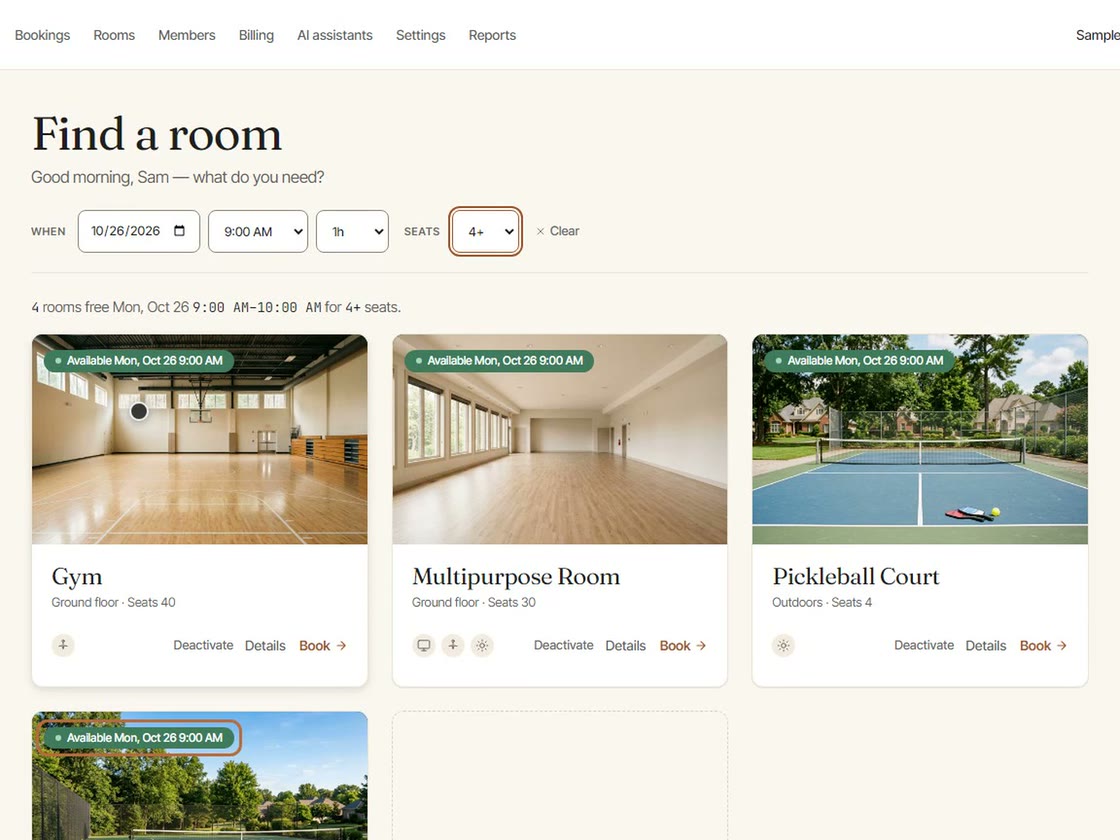
Filter by time and seats, see today’s schedule for every room, and book, change or cancel in a click.
Recurring bookings
Weekly on chosen days, every other week or monthly, booked once as a series. Dates already taken are skipped and listed.
Book from your AI assistant
Optional: connect Claude or ChatGPT and ask in plain words — find a free room, book a series, move a booking. Same rules as the website.
Running it
Hours for each room
Each room has its own opening hours, so nothing lands when the building is closed. Take a room offline without losing its history.
Booking rules
Set the longest booking, how far ahead people can book, a weekly hours cap per person, and optional capacity checks.
Check-in and no-show release
Optional: if nobody checks in within the grace period you choose, the room opens up again.
Usage reports
Bookings, hours, utilization and no-show rate for each room, with a CSV export.
Members and privacy
Invite people by email. Members see that a room is taken, never who booked it; admins see who booked.
Export or close any time
Download your workspace’s data whenever you like, or close it from Settings.
Trust
Isolated at the database
Every workspace's rooms and bookings are separated at the database level — enforced by row-level security, not by hoping a query got the filter right.
No tracking pixels, no ads
No ad pixels, no tracking cookies, no user-level analytics. Our network provider counts page views and load times without cookies. Links from our own ads carry a campaign label so we know which ads work.
Your data trains nothing
We don't use your bookings or your people's information to train AI models, and we don't let anyone else.
One price. Rooms, not seats.
A workspace is your organization’s rooms and people.
Includes 5 active rooms. Each additional active room is $8/month.
- Start with 30 days per person — up to 5 active rooms, no card needed, and nothing is charged unless you subscribe
- Unlimited bookings; up to 25 members during the trial
- Add or remove rooms any time — you're billed for what's active
- Monthly, cancel any time from your billing page
- No per-user fees, no setup fee
Prices in USD, before applicable taxes. Full terms at app.summabooking.com/terms.
5 rooms → $49/mo · 8 rooms → $73/mo · 20 rooms → $169/mo
See it working before you sign up.
The shared demo workspace — “SummaTower” — resets nightly. No account needed.
Try the live demo